₹62,500.00 – ₹63,500.00Price range: ₹62,500.00 through ₹63,500.00 inc. Gst
Product Overview
| Product Name | Meta Quest 3 VR Headset |
| Storage | 128 GB / 256 GB / 512 GB Internal Storage |
| Processor | Qualcomm Snapdragon XR2 Gen 2 Chipset |
| RAM | 8 GB RAM |
| Display | 2064 × 2208 pixels per eye (4K+ display) |
| Refresh Rate | 72 Hz / 90 Hz / 120 Hz |
| Lens Type | Advanced Pancake Lenses |
| Mixed Reality | Dual RGB Cameras with Full-Colour Pass-through |
| Controllers | Meta Quest Touch Plus Controllers with Haptic Feedback |
| Connectivity | Wi-Fi 6E with Quest Link & Air Link for PC VR |
| Battery Life | Up to approx. 2.2 hours usage |
The Meta Quest 3 VR Headset represents the next generation of immersive virtual and mixed reality technology, combining powerful performance, stunning visuals, and advanced interaction features in a sleek and lightweight design. Built with the Qualcomm Snapdragon XR2 Gen 2 processor and enhanced graphics performance, this headset delivers faster load times, smoother gameplay, and highly realistic digital environments.
Whether you’re exploring expansive virtual worlds, enjoying cinematic entertainment, collaborating in virtual workspaces, or experiencing next-level gaming, Meta Quest 3 transforms the way you interact with digital content. With its full-colour mixed reality pass-through system, users can seamlessly blend the real world with virtual experiences, opening the door to new creative and interactive possibilities.
Available in 128GB, 256GB, and 512GB storage options, the headset provides ample space to download games, applications, and media for offline enjoyment. Designed to be 30% slimmer than its predecessor, Meta Quest 3 offers improved comfort and balance, making it ideal for long gaming sessions or immersive virtual experiences.
The Meta Quest 3 is powered by the advanced Snapdragon XR2 Gen 2 chipset, delivering significantly improved graphics and processing performance compared to previous models. This powerful hardware allows the headset to handle demanding VR applications, fast-paced games, and detailed environments without lag.
Featuring a stunning display resolution of 2064 × 2208 pixels per eye, the headset provides crystal-clear visuals with improved pixel density. This ensures sharper images, vibrant colors, and lifelike detail, making every virtual environment feel more immersive.
The headset supports refresh rates of 72Hz, 90Hz, and 120Hz, ensuring smooth motion and responsive gameplay. Higher refresh rates reduce motion blur and enhance the realism of fast-moving scenes.
Equipped with next-generation pancake lenses, Meta Quest 3 offers improved image clarity and reduced light distortion. This advanced optical system enhances visual sharpness while allowing the headset to maintain a slim and lightweight profile.
With dual RGB cameras, the headset enables high-quality pass-through vision that blends your real-world surroundings with virtual elements. This feature allows users to interact with digital objects while still seeing the physical space around them.
Meta Quest 3 supports Direct Touch hand tracking, allowing users to navigate menus, interact with apps, and control virtual objects using natural hand movements. It also includes Meta Quest Touch Plus controllers that provide precise tracking and ergonomic comfort.
The integrated stereo speakers deliver spatial audio that surrounds you with realistic sound. This immersive audio system enhances gaming, movies, and virtual experiences without requiring external headphones.
The headset is available in 128GB, 256GB, and 512GB storage variants, giving users the flexibility to choose the capacity that best suits their needs. Larger storage options allow you to download more games, applications, and media content.
Weighing approximately 515 grams, Meta Quest 3 features a balanced and comfortable design that is 30% slimmer than the previous generation. The adjustable soft strap provides a secure fit for different head shapes and extended use.
With Wi-Fi 6E support, the headset ensures faster downloads and stable connections. It can also connect to a PC using Meta Quest Link or Air Link, allowing users to access high-performance PC VR games and applications.
Begin by charging the headset and powering it on. Follow the on-screen instructions to connect to Wi-Fi and sign in to your account.
Use the adjustable strap to secure the headset comfortably. Adjust the IPD (Interpupillary Distance) using the lens spacing wheel for optimal visual clarity.
Turn on the Touch Plus controllers or enable Direct Touch hand tracking through the settings to start navigating the interface and interacting with virtual content.
Access the Meta Quest library to download and launch VR games, productivity apps, or entertainment experiences.
Use a microfiber cloth to gently clean the lenses and avoid using liquid cleaners directly on them.
When not in use, keep the headset in a dry and dust-free environment to protect the display and sensors.
Avoid overcharging and store the device with moderate battery levels when not used for extended periods.
Keep the headset firmware and applications updated to ensure optimal performance and access to new features.
The Meta Quest 3 VR Headset is available in 128 GB, 256 GB, and 512 GB internal storage variants.
Yes, it features full-color pass-through cameras that enable high-quality Mixed Reality (MR) experiences, blending real and virtual worlds.
It is powered by the Qualcomm Snapdragon XR2 Gen 2 chipset with 8 GB RAM, delivering smooth performance and excellent graphics.
The headset has 2064 × 2208 pixels per eye (4K+ resolution) with support for 72 Hz, 90 Hz, and up to 120 Hz refresh rate.
Yes, the package includes two Meta Quest Touch Plus Controllers with improved ergonomics and haptic feedback.
The battery provides up to approximately 2.2 hours of usage depending on the type of content and settings used.
Yes, you can connect it via Quest Link (wired) or Air Link (wireless) to play PC VR titles with higher graphics settings.
| Category | Specification |
|---|---|
| Product Name | Meta Quest 3 VR Headset |
| Available Storage | 128 GB / 256 GB / 512 GB Internal Storage |
| Processor / Chipset | Qualcomm Snapdragon XR2 Gen 2 platform with double GPU processing power compared to Quest 2 |
| RAM (DRAM) | 8 GB RAM – 33% more memory than Meta Quest 2 |
| Display Resolution | 2064 × 2208 pixels per eye (4K+ Infinite Display) |
| Pixel Density | 1218 PPI with 25 PPD for sharper visuals |
| Refresh Rate | 72 Hz / 90 Hz / 120 Hz |
| Field of View | 110° Horizontal / 96° Vertical |
| Optics / Lens Type | Pancake Lens with improved clarity and reduced light artifacts |
| IPD Adjustment | Mechanical lens adjustment wheel supporting 53–75 mm IPD range |
| Pass-through Cameras | Dual RGB cameras with depth projector for full-colour mixed reality |
| Pass-through Resolution | 4.5× higher resolution than Quest 2 |
| Hand Tracking | Direct Touch hand tracking using advanced AI computer vision |
| Controllers | Meta Quest Touch Plus controllers with ring-free ergonomic design |
| Haptic Feedback | TruTouch variable haptics for immersive tactile feedback |
| Audio System | Integrated stereo speakers with 3D spatial audio |
| Audio Port | 3.5 mm headphone jack for external audio devices |
| Battery Life | Average up to 2.2 hours usage |
| Gaming Usage | Approx. 2.4 hours |
| Media Playback | Approx. 2.9 hours |
| Charging Time | Approx. 2.3 hours with 18W power adapter |
| Connectivity | Wi-Fi 6E certified (region dependent) |
| PC Compatibility | Supports Meta Quest Link cable and Air Link for PC VR gaming |
| Headset Weight | Approx. 515 grams |
| Design | 30% slimmer design compared to Quest 2 |
| Strap Type | Adjustable soft strap (optional hard strap sold separately) |
| Content Library | Access to thousands of VR games, apps and experiences |
| Backwards Compatibility | Compatible with Meta Quest 2 apps and games |
| Privacy Indicator | External LED light indicates when cameras are active |
| Security Features | Advanced encryption, PIN/password protection and customizable privacy settings |
| Storage | 128 GB, 256 GB, 512 GB |
|---|

In stock
Read more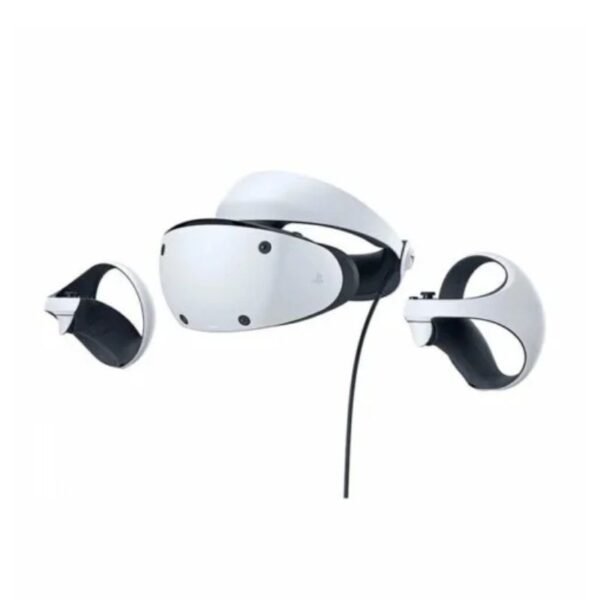
In stock
Read more
Out of stock
Select options This product has multiple variants. The options may be chosen on the product page
In stock
Add to cart


Reviews
There are no reviews yet.