
₹22,000.00 Original price was: ₹22,000.00.₹15,799.00Current price is: ₹15,799.00. inc. Gst
Product Overview
| Product Name | DJI Air 2 / Air 2S Charging Hub |
| Compatibility | DJI Mavic Air 2, Air 2S Batteries |
| Battery Slots | 3 |
| Charging Power | Up to 38W |
| Input Voltage | 8.4–13.2 V |
| Input Amperage | 2.82 A |
| Dimensions | 145 × 55 × 25 mm |
| Weight | Approx. 120 g |
| Operating Temperature | 5°C to 40°C |
| Display | LED charging indicators |
In stock
If you’re tired of charging your drone batteries one by one and waiting forever to fly again, the DJI Air 2 / Air 2S Charging Hub is your ultimate solution. Designed to support both DJI Air 2 and Air 2S Intelligent Flight Batteries, this hub is like the power manager you never knew you needed. Whether you’re a casual hobbyist or a serious aerial filmmaker, this charging hub helps you stay ready with fully charged batteries for every flight.
This charging hub is built to take the hassle out of battery charging. It lets you connect up to three DJI Air 2 or Air 2S batteries, and the smart system will charge them one by one, starting with the battery that has the most remaining power. This means you can get one battery ready to fly sooner while the others charge in the background—no more guesswork, no more babysitting your charger. Just plug in your batteries, walk away, and come back when they’re full and ready for flight.
Instead of charging all three batteries at once, which would take forever and overload your adapter, this hub charges each battery smartly, starting with the one that will be ready the fastest. This clever system helps save time, reduce stress on your charger, and make sure your drone is ready to go when inspiration strikes. If you’re on the field or working on a tight shoot schedule, this feature is a lifesaver.
Nobody wants to carry extra weight, especially drone pilots already lugging around gear. That’s why this charging hub is made super compact and lightweight, so you can easily tuck it into your drone case or backpack. Whether you’re hiking to a mountaintop for a cinematic shot or shooting a wedding in a remote village, this hub travels with you without making a fuss. It’s the silent hero of your gear bag.
This charging hub also comes with clear and simple LED indicators that show you the real-time charging status of each battery. No confusion, no blinking codebook needed—just a quick glance and you’ll know which battery is charging, which one is done, and how long you’ve got until takeoff. It’s like traffic lights for your drone batteries, minus the honking.
Don’t worry, this charging hub doesn’t just fill your batteries—it takes care of them too. The hub works seamlessly with DJI’s intelligent battery technology to prevent overcharging, overheating, or charging errors. This keeps your batteries healthy and extends their lifespan, so you’re not replacing expensive gear before its time. It’s like a spa day for your drone batteries every time you plug in.
Connect the charging hub to a DJI charger using the compatible power cable.
Insert up to three DJI Air 2 or Air 2S batteries into the hub slots.
The hub automatically starts charging the battery with the most remaining power first.
Check the LED indicators to track progress and charging order.
Once fully charged, remove the batteries and get ready for takeoff.
Gently wipe the outer casing with a dry microfiber cloth to remove dust and dirt.
Use a soft brush or air blower to clear dust from the battery slots.
Avoid any contact with liquids or solvents to protect internal electronics.
Keep the hub away from sand, mud, or direct sunlight when not in use.
Store it in a clean, padded case to avoid physical damage during transport.
Always use original DJI power adapters for charging to ensure safe voltage levels.
Do not expose the hub to extreme heat, moisture, or freezing temperatures.
Never insert swollen or damaged batteries into the hub.
Let the hub cool down after continuous use to avoid overheating.
Inspect the hub regularly for wear, dirt, or unusual signs of damage before use.
Do:
Use only DJI Air 2 or Air 2S Intelligent Flight Batteries.
Monitor the LED lights during charging.
Keep the charging hub in a dry and safe place.
Unplug the hub when not in use.
Charge batteries before storage if you’re not flying for a while.
Don’t:
Use third-party or incompatible batteries.
Try to repair the charging hub yourself.
Charge wet or damaged batteries.
Use the hub in dusty or humid environments.
Stack batteries on top of each other during charging.
The DJI Air 2 / Air 2S Charging Hub is more than just a charger—it’s a smart tool that helps you fly more, wait less, and protect your investment. With its clever charging system, compact design, and intelligent safety features, it’s a must-have for anyone who owns multiple DJI Air 2 or Air 2S batteries. Whether you’re preparing for an epic shoot or just a fun afternoon flight, this hub gives you power when you need it without any hassle.
Don’t let dead batteries kill your drone dreams. Grab the DJI Air 2 / Air 2S Charging Hub today and keep your flight time running high!
It is compatible with DJI Mavic Air 2 and Air 2S Intelligent Flight Batteries.
It charges up to three batteries sequentially, starting with the one that has the most remaining power to save time.
No, it charges them one by one to reduce stress on the charger and improve efficiency.
It includes protection against overcharging, overheating, and short circuits to extend battery lifespan.
It measures 145 × 55 × 25 mm and weighs approximately 120 g, making it compact and lightweight for travel.
| Specification | Details |
|---|---|
| Product Name | DJI Air 2 / Air 2S Charging Hub |
| Compatibility | Designed for DJI Mavic Air 2 and Air 2S Intelligent Flight Batteries |
| Battery Slots | Allows sequential charging of up to 3 batteries |
| Charging Power | Maximum output power of 38 watts for efficient battery recharging |
| Input Voltage | Accepts 8.4 V to 13.2 V input voltage |
| Input Amperage | Supports up to 2.82 A input current |
| Dimensions | Compact build with 145 mm length, 55 mm width, and 25 mm height |
| Weight | Lightweight at approximately 120 grams |
| Operating Temperature | Functions effectively in ambient temperatures between 5°C to 40°C |
| Display | Features LED indicators for clear visual battery status |
| Safety Features | Built-in protection against overcharging, overheating, and short circuits |
| Additional Features | Automatically prioritizes the battery with the highest charge level for sequential efficiency |

In stock
Add to cart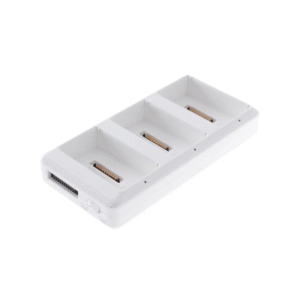
In stock
Add to cart
In stock
Add to cart
In stock
Add to cart



Reviews
There are no reviews yet.