Product Overview
| Display | 2.0 inch (220×176 pixels) |
| Language | English Version |
| Output | Cable (updated version has Wi-Fi, Bluetooth) |
| Storage Capacity | 2000 pcs, 640,000 data |
| Auto Power Off | Yes, when inactive |
| Power Supply | 3.7V Lithium battery, 1050mA |
| Port | USB (updated type: Bluetooth and Wi-Fi) |
| Collection Mode | Auto display and data recording |
| Dimensions | 150 × 62 × 39 mm |
| Weight | 0.1 kg (including battery) |
| Standard Impact Energy | 2.207 J |
| Tension Spring Rigidity | 7.85 N/m |
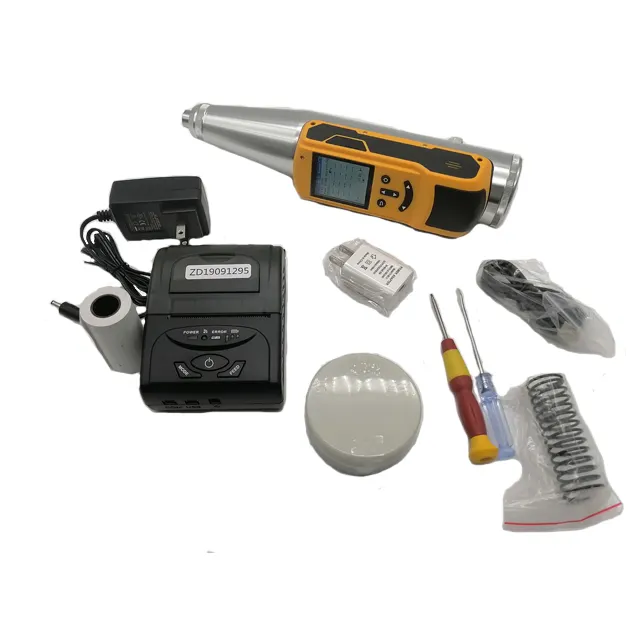
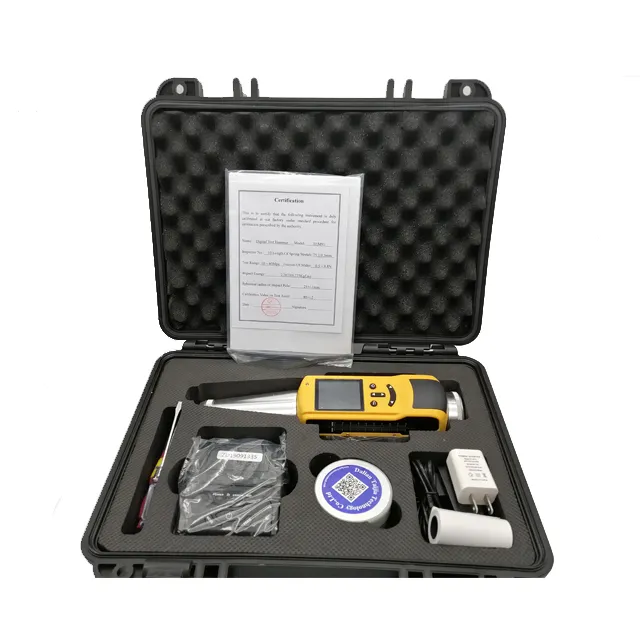
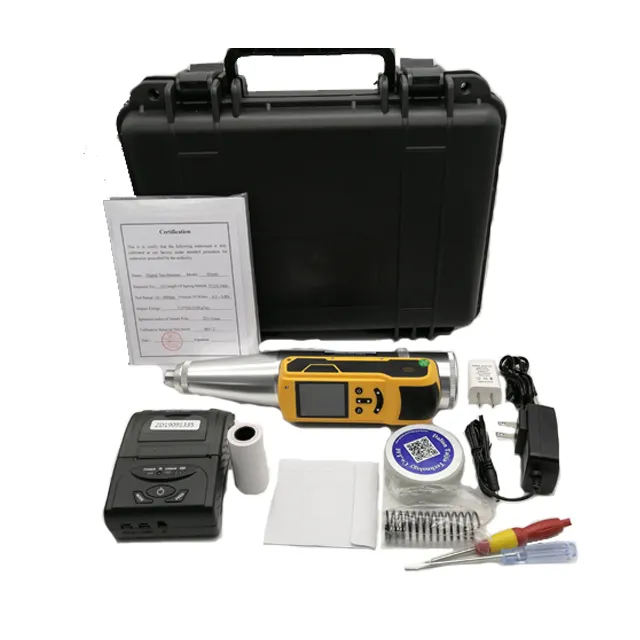
The TEM91 Digital Concrete Test Hammer is an advanced and portable device designed for engineers, inspectors, and construction professionals who need a precise and efficient solution for non-destructive concrete strength testing. Combining modern digital interface features with classic rebound hammer principles, the TEM91 allows for faster, more accurate measurements with digital data storage and wireless data transmission options. This innovative tool brings together a user-friendly 2.0-inch color display, large internal memory, automatic data recording, and an upgraded model offering Bluetooth and Wi-Fi capabilities. Whether you’re on a high-rise construction site or evaluating infrastructure health in the field, the TEM91 is the smart solution for reliable concrete testing and reporting.
1. High-Resolution 2.0-Inch Display with User-Friendly Interface
The TEM91 comes equipped with a full-color 2.0-inch LCD display featuring a resolution of 220 × 176 pixels, providing a crystal-clear visualization of test data, readings, and menu options. This intuitive display interface supports quick review of measurement records and easy navigation through device settings and stored test data, even under bright sunlight or dim conditions. The English-language version ensures global usability and removes ambiguity in field operations.
2. Smart Data Logging with High Capacity and Automatic Recording
Designed for high-volume fieldwork, the TEM91 supports automatic data collection and real-time display without requiring manual logging. Its onboard memory can store up to 2000 complete test sets and over 640,000 individual data points, offering ample storage for large-scale testing projects. With the auto-record feature, every impact is saved instantly, ensuring no data is lost, and minimizing user interaction during tests—streamlining the entire process and increasing productivity.
3. Versatile Output Options: USB, Bluetooth, and Wi-Fi (Updated Model)
The standard model supports USB connectivity for easy data export, while the updated version includes Bluetooth and Wi-Fi functionalities. This enables seamless data transmission to your mobile devices, tablets, or computers, allowing technicians to generate instant reports or integrate with cloud-based systems in real time. With wireless communication, the TEM91 adapts to modern workflows, enabling paperless documentation and fast data sharing between teams and departments.
4. Efficient Power Management with Long Battery Life
The TEM91 is powered by a 3.7V lithium-ion rechargeable battery with a 1050 mAh capacity. This ensures extended operational time in the field, minimizing interruptions during testing sequences. Its power management system includes automatic shut-off after periods of inactivity, conserving battery life when not in use. Recharging via USB port is simple and fast, keeping the unit ready for the next round of testing without requiring external battery replacements.
5. Compact, Lightweight, and Built for Portability
Weighing only 0.1 kg including the battery and measuring just 150 × 62 × 39 mm, the TEM91 is exceptionally lightweight and easy to handle. Its ergonomic design fits comfortably in one hand, making it suitable for both vertical and overhead testing applications. The compact size allows for convenient storage in tool bags or pockets, and it’s ideal for inspectors who perform regular testing across multiple job sites.
1. Schmidt Hammer Integration with Industry-Standard Impact Energy
At its core, the TEM91 integrates a classic Schmidt hammer with a standard impact energy of 2.207 J, ensuring compatibility with international testing standards. The tension spring has a calibrated rigidity of 7.85 N/m, providing accurate rebound readings essential for evaluating the compressive strength of concrete surfaces. These mechanical specifications ensure that the digital measurements remain reliable and traceable for compliance and certification purposes.
2. Real-Time Collection Mode for Accurate and Efficient Data Capture
Engineered for convenience, the TEM91’s collection mode operates automatically, displaying rebound values and recording data instantly after each hammer impact. This real-time feedback loop helps eliminate errors and the need for repeated tests. The internal system performs calculations based on predefined algorithms, streamlining workflows and allowing users to focus on analysis rather than raw data entry.
3. Multi-Site Project Capability with High Storage and Export Tools
Thanks to its large data capacity and wireless export options, the TEM91 is perfectly suited for large infrastructure projects, including bridges, tunnels, highways, and commercial construction sites. It allows users to perform and track thousands of tests across various locations without the need for external memory devices. Once collected, data can be exported via USB or wirelessly for archiving, documentation, or statistical analysis.
4. Reliable Operation with Automated Power Management
In addition to long battery life, the TEM91 includes an intelligent auto power-off feature that conserves energy when the device is idle. This is particularly beneficial on busy job sites where forgetting to turn off tools can drain batteries. When in use, the unit delivers consistent performance with minimal maintenance, ensuring reliability during long inspection routines.
5. Upgradeable Platform for Future Compatibility
The updated version of the TEM91 is future-ready, with hardware that supports both Wi-Fi and Bluetooth for modern integration. This upgradeable model allows compatibility with future software platforms and apps, ensuring the device remains relevant and useful as digital workflows evolve. Whether you’re syncing data to mobile apps or integrating with centralized reporting systems, the TEM91 adapts to your tech ecosystem.
The TEM91 Digital Concrete Test Hammer revolutionizes concrete inspection with a blend of mechanical precision and modern digital efficiency. With automatic data collection, wireless connectivity, and massive storage capacity, it simplifies repetitive testing without compromising accuracy. Its lightweight design ensures portability, while the strong impact energy and factory-calibrated spring maintain test integrity across hundreds of uses. For engineers, inspectors, and construction managers, the TEM91 isn’t just a smart tool—it’s your reliable companion for ensuring the strength and consistency of concrete structures. From jobsite to report desk, the TEM91 makes concrete testing faster, smarter, and more professional.
| Category | Feature/Parameter | Specification |
|---|---|---|
| Digital Components | Display | 2.0 inch (220×176 pixels) |
| Language | English Version | |
| Output | Cable (Update version has Wi-Fi, Bluetooth) | |
| Storage Capacity | 2000 pcs, 640 thousand data | |
| Turn Off | Automatic turn off without operation | |
| Power Supply | 3.7V Lithium battery, 1050mA | |
| Port | USB (Update type: Bluetooth and Wi-Fi) | |
| Collection Mode | Automatic display and record data | |
| Size (mm) | 150 × 62 × 39 | |
| Weight (kg) | 0.1 kg (including battery) | |
| Schmidt Hammer Specs | Standard Impact Energy | 2.207 J |
| Rigidity of Tension Spring | 7.85 N/m |


Reviews
There are no reviews yet.